A full server list on the hours that matter.
Real FiveM clients join your server on an hourly curve, per weekday, offset by jitter.
txAdmin, the browser and /players.json read that same count, because the sessions are real.
Stripe checkout. Card, Apple Pay, Google Pay, SEPA. Cancel any time.
How it works
Connect the server, set the curve, watch the count. The connect step takes a minute.
Connect the server
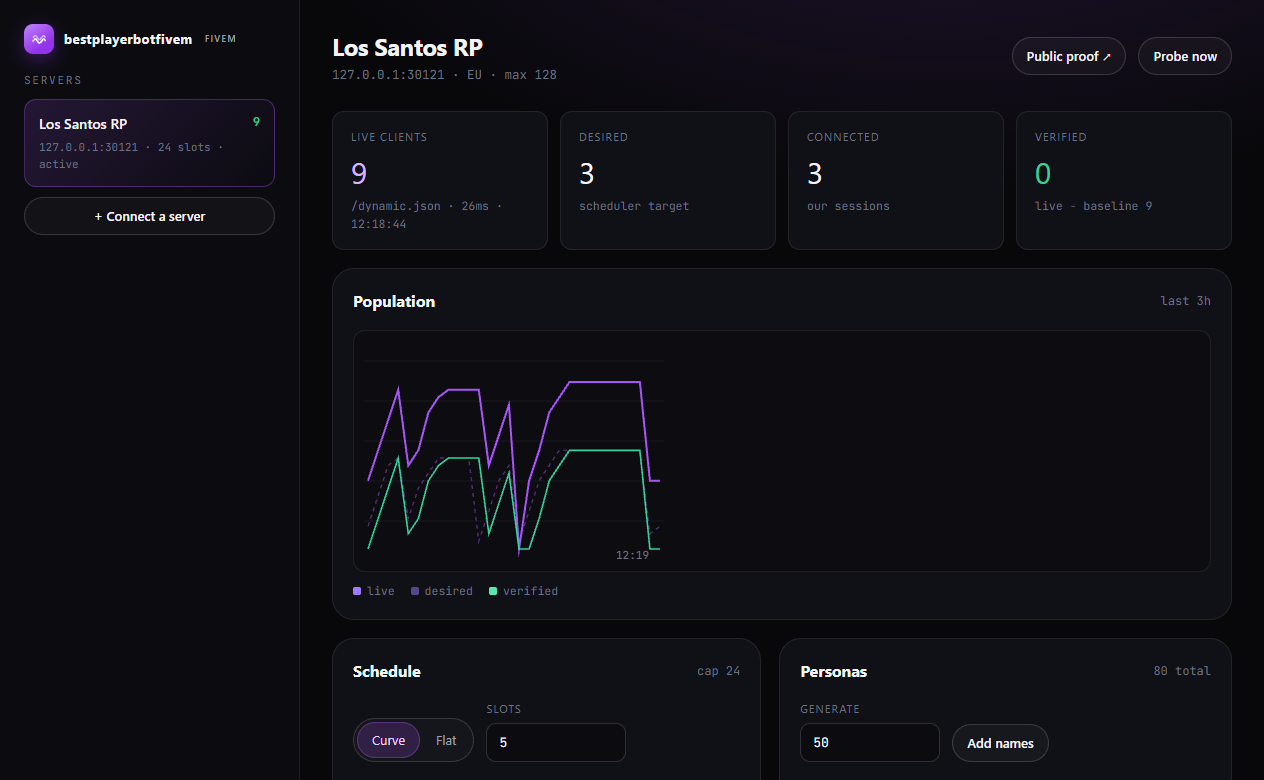
Paste the IP and port. We read /dynamic.json once and store the client count as your baseline.
Pick a schedule
A target for each hour of each weekday, or one flat number for an event. Joins ramp in over your ramp minutes instead of landing at once.
Watch the count
The worker re-reads /dynamic.json every minute and adds or drops sessions to match the hour.
Customization
What you can change per server, from the dashboard or Discord.
- Slots, 1 to 1,000
- A slot is one connected client. Price is per slot, so the count you buy is the count you see.
- Custom names
- Paste a list, one name per line. Any name can be renamed later; each session keeps its name across reconnects.
- Curve per weekday
- 24 targets for each day. Tuesday 18:00 can be 60 while 04:00 is 12, so the graph moves like a real server.
- Flat mode
- Hold one number around the clock for an event or a launch night. /fivemfakeplayers set 45.
- Ramp and jitter
- Joins spread over your ramp minutes. Jitter scatters them inside that window.
- Timezone
- Curves follow your server's local time, so peaks stay on the evenings your players use.
- Region
- Pick the worker region nearest your box to keep join latency flat.
- Headroom for real players
- Set the cap below your max client limit, so real players always have room and the sessions never take the last seats.
If it did not land, you see it.
The proof endpoint reads your server directly, subtracts the baseline and publishes the difference with a timestamp. Anyone can open it, so staff and players check the same number you do.
- One URL per server. Anyone can open it, no login.
- Refreshed every minute. Not a screenshot from setup day.
- Events when something breaks. Failed joins, dropped sessions, unreachable probes.
# your server, read directly
curl -s http://play.example.com:30120/dynamic.json
{
  "clients": 41,
  "sv_maxclients": 128,
  "hostname": "Los Santos RP"
}

# what the API returns
{
  "liveClients": 41,
  "baseline": 9,
  "verified": 32,
  "checkedAt": "2026-11-21T10:38:57Z"
}
Pricing
Per slot. No setup fee. Order 1 to 1,000 slots. A slot is one connected client.
Monthly
start hereBilled monthly. Cancel any time.
- Real sessions, one count everywhere
- Curves per weekday, or flat mode
- Public proof endpoint
- Discord commands and REST API
Annual
save 20%Billed once a year. Same product.
- Everything in Monthly
- Priority placement on the fleet
- Named worker region
- Invoice on request
Checkout quantity is the slot count: 5 slots at EUR 2.49 is EUR 12.45 a month.


 SEPA
Install in one command.
Sign in with Discord, add the server, generate a one-time install token. The installer drops the resource, patches server.cfg, opens the firewall and binds the server to your panel.
- 01 Connect Discord and add the server in the dashboard.
- 02 Press Install and copy the one-time command.
- 03 Run it on the server. Restart. Counts are live.
The installer is checksum verified. Your license key is never written to disk; the resource pulls its config with the install token.
powershell -ExecutionPolicy Bypass -File bootstrap-install.ps1 -Api https://api.fivemfakeplayers.site -Token bpbf_1f4c9a... -ServerPath "C:\FXServer"Questions
Does it show in txAdmin and the server browser?
Yes. Each session is a real connection, so the server's own client count moves. txAdmin, the browser list and /players.json read that same count.
How do I install it?
Dashboard, server, Install. You get a one-time command. It copies the resource into your resources folder, adds the ensure line to server.cfg, opens the firewall port and writes the install token. Restart when it finishes.
What happens to my license key?
The key stays on your server and we never ask for it. The installer stores a one-time install token instead, the resource pulls its runtime config over HTTPS, and you can revoke the token from the dashboard.
Can the names look like my real players?
Paste your own list, one name per line, and rename any of them later from the dashboard. Names are the ones you supply; they do not come from us.
What does verified mean?
The current count from your /dynamic.json minus the baseline recorded when you connected. It is the number we can prove, not the number we asked for.
What happens when my server restarts?
Sessions drop with the server. The worker rejoins on the next tick, ramped over your ramp minutes, so the curve picks up where it left off.
What if a worker fails or a join does not land?
The dashboard lists failed joins, dropped sessions and unreachable probes with a timestamp, and the proof number drops to match. Nothing is retried silently against a server that stopped answering.
Pick a slot count.
Connect a server, set your curve, and watch your own endpoint move.